
Every company involved in an EWSR notification or waste shipment must register with DIWASS . This applies to notifiers, producers, carriers, brokers, recipients, waste treatment facilities and interim treatment facilities.
To access DIWASS, you must first create a personal EU Login account. You can then register your organisation in DIWASS. Next, for organisations established in the Netherlands, you must ask the Human Environment and Transport Inspectorate (ILT) to approve your organisation's account. Once your organisation has been approved, you can add colleagues to the organisation's account in DIWASS.
If your organisation has several locations, you must first register your main location and await approval. You can then register the other locations.
This page explains how to register a company and add colleagues to the company account. You can also watch the instructional videos.
Register a company in DIWASS
To register a company in DIWASS, an employee of the company must first create a personal EU Login account. This employee can then register the company and subsequently apply for authorisation. In the Netherlands, authorisation is granted by the ILT. This employee automatically becomes the Master User and can then manage the account. Below you will find the step-by-step guide for registering a company in DIWASS.
Every employee who will use DIWASS needs an EU Login account.
You can create an EU Login account by clicking on ‘Create an account’.
If you need help, you can find instructions on the EU Login website.
Once you have created your personal account, you can log in to DIWASS.
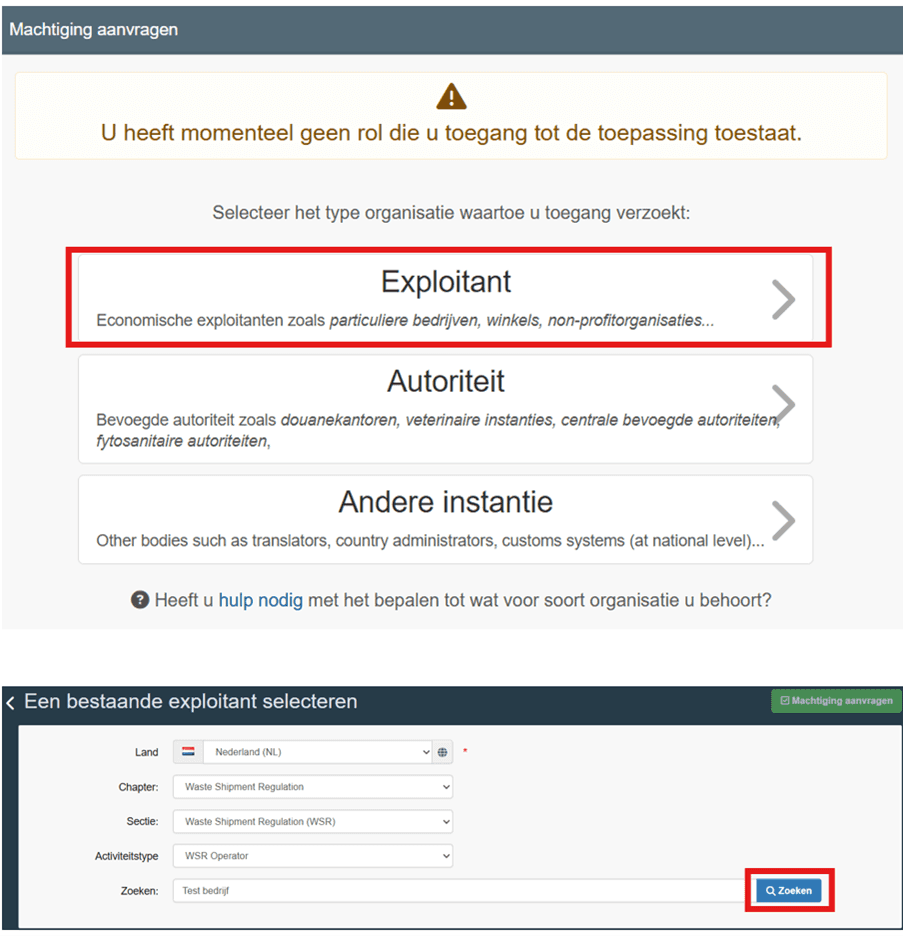
After logging in, click on ‘Operator’. In some cases, the button may also be called ‘Exploitant’.
If your company have several locations, you must first register your main location and wait for ILT approval. You can then register the other locations.
If your application has been rejected, you can delete your previous application by clicking on the bin icon.
After clicking on ‘Operator’ or ‘Exploitant’, a new screen will appear. Complete the fields as follows:
-
Land or Country: Select ‘Netherlands’.
-
Chapter: Select ‘Waste Shipment Regulation’.
-
Sectie or Section: Select ‘Waste Shipment Regulation (WSR)’.
-
Activiteitstype or Activity type: Select ‘WSR Operator’.
-
Zoekveld or Search field: Enter your company name.
After completing these fields, click on the blue ‘Search’ or 'Zoeken' button.
A new button called ‘Create new operator’ or 'Nieuwe exploitant aanmaken' will appear after you search for the company you want to add. Click on this button if your company is not yet registered in DIWASS.
-
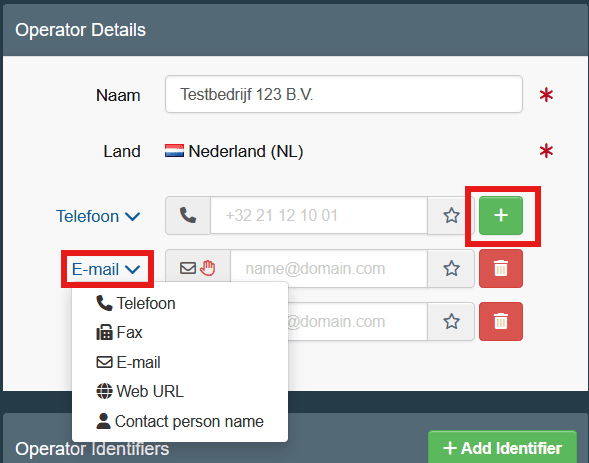
After clicking on ‘Create new operator’ or Nieuwe exploitant aanmaken', a new screen called ‘Operator Details’ will appear.
Complete the fields as follows:
-
Naam or Name: Enter your company's official registered name. It must match the name registered with the Kamer van Koophandel, KVK (Chamber of Commerce). You can check this on your KVK registration extract or on the KVK website.
-
Land or Country: Select ‘Netherlands’ or 'Nederland'.
-
Telefoon or Telephone: Enter your telephone number.
-
Click on the green plus sign next to ‘Telephone’. A new field for contact details will appear below the phone number.
-
Click on the down arrow and select ‘E-mail’.
-
Enter your email address in this field.
-
Click on the green button again and select ‘Contact person name’.
-
Enter the first name and surname of your contact person.
-
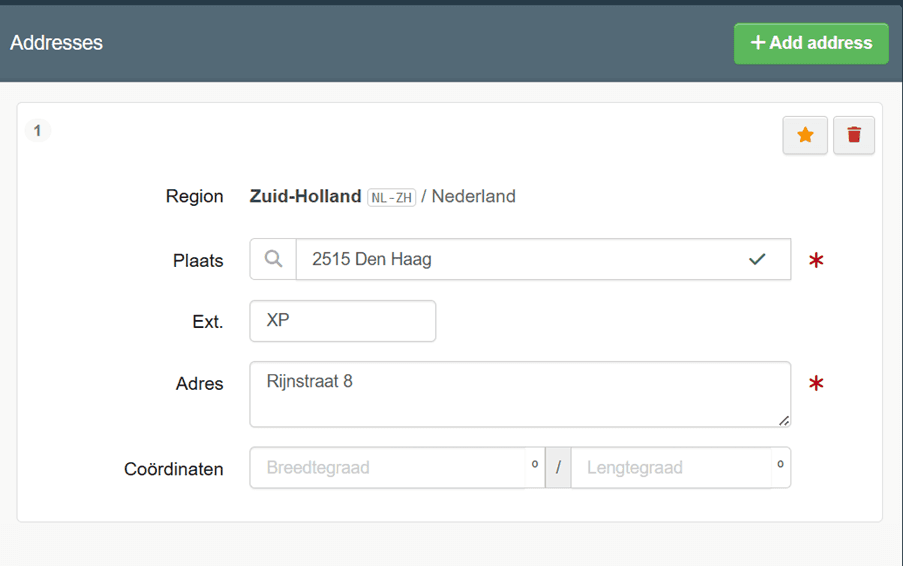
In the ‘Addresses’ section, enter your company address as follows:
-
Plaats or City: Enter the numbers from your postcode. For example, 2514. A list of place names will then appear. Select the correct place.
-
Ext.: Enter the letters from your postcode. For example, XP.
-
Adres or Address: Enter your street name and house number. For example, Rijnstraat 8.
-
You do not need to enter the coördinaten or coordinates.
-
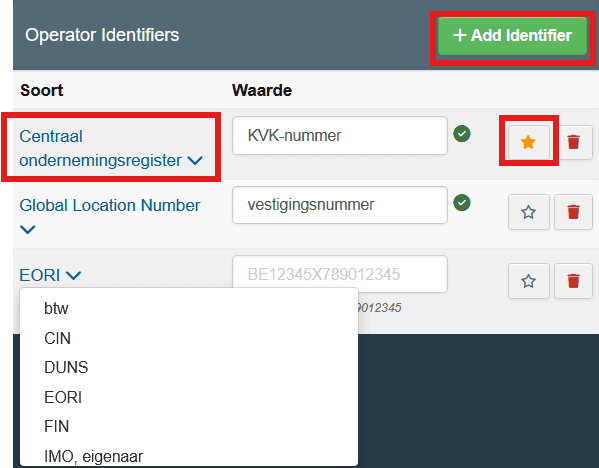
For your company's main location, complete the following fields:
-
Centraal ondernemingsregister or Central Business Register: Enter your KVK number. Then click on the star next to this field.
-
Global Location Number: Enter your KVK vestingsnummer or KVK establishment number.
-
EORI: You only need to enter your EORI number if you already have one.
You can add a new identification number by clicking on the green ‘Add Identifier’ button.
For an additional company location, only enter the location number under ‘Global Location Number’. You do not need to enter a KVK number or an EORI number for this location.
-
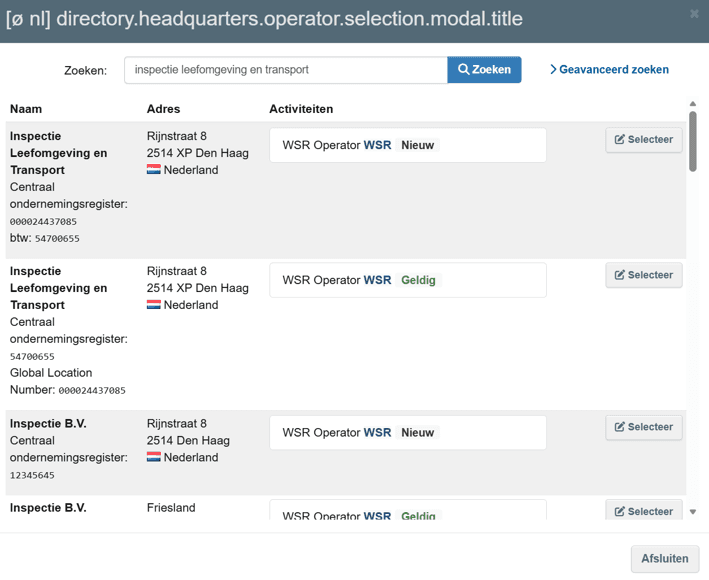
Follow this step only if you want to add another company location to your main location.
-
Click on ‘Add to headquarters’.
-
Enter the official registered name of your main location in the search field.
-
Click on ‘Search’.
-
Find the correct name and click on 'Selecteer' or ‘Select’.
-
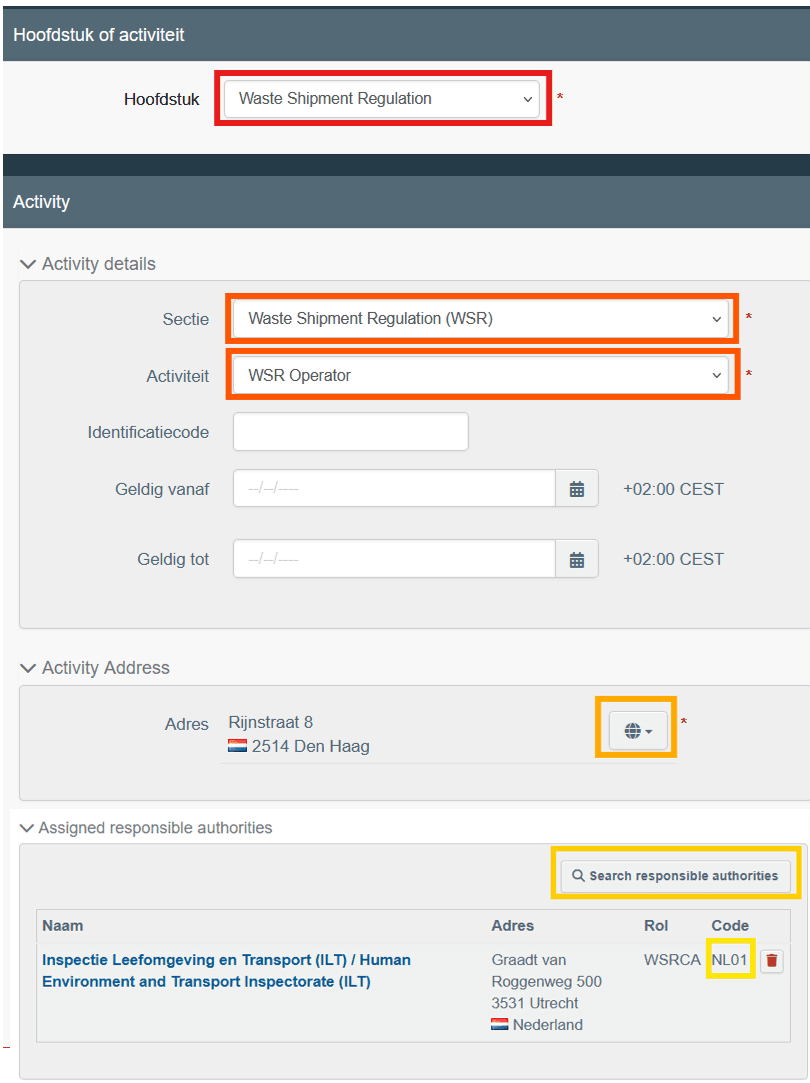
You can now link the application to the authority responsible for DIWASS registration approval.
-
Click on the green ‘Add Activity Section’ button at the top of the page.
-
Scroll down to the 'Selectie selecteren' or ‘Select Section’ field.
-
Select ‘Waste Shipment Regulation (WSR)’ from the dropdown menu.
-
Click on the green ‘Add Activity’ button.
-
Select ‘WSR Operator’ from the first dropdown menu.
-
Click on ‘Search responsible authorities’.
-
Enter ‘Inspectie Leefomgeving en Transport (ILT)’ or ‘NL01’ in the search field.
-
Click on 'Selecteer' or ‘Select’.
The ILT will now appear as the authority responsible for handling your application.
-
Make sure that you have entered the following information correctly:
-
Your company's official registered name
-
Telephone number
-
Email address
-
Contact person's name
-
KVK number
-
KVK-vestigingnummer (KVK Establishment number)
The ILT cannot approve your registration if any of these details are incorrect.
When you have checked that all the information is correct:
-
Click on the blue 'Nieuwe exploitant'' or ‘Create new operator’ button at the top of the screen.
-
On the next screen, click on the blue 'Een machtigingsverzoek versturen' or ‘Send authorisation request’ button.
Your application for a company account will now be sent to the ILT.
-
The ILT will process your application within 5 working days.
If your application is rejected, you will receive a message. You will not receive a message if your application is approved.
To check whether your company has been approved:
-
Log in to DIWASS.
-
Click on your email address (account) in the top-right corner.
-
Check whether your company appears under 'Beschikbare profielen' or ‘Available Profiles’.
If information is missing or incorrect, the ILT will reject your application. You will receive an email from the ILT explaining how to submit your application again with the correct information.
-
Add a colleague to your company account in DIWASS
Every colleague who will use DIWASS for EWSR notifications and waste shipments needs an account linked to your company. The company's Master User is responsible for giving colleagues access. The Master User is the employee who first created an account and registered the company. Once colleagues have been added to the company account, they can: 1. Submit notifications. 2. Answer questions from the authorities. 3. Manage waste shipment notifications, including notifications and Annex VII documents. Follow the steps below to add a colleague to your company account.
Every employee who will use DIWASS needs an EU Login account.
Your colleague can create an account on the EU Login website. They must click on ‘Create an account’ to create a personal account.
Once your colleague has created a personal account, they can log in to DIWASS.
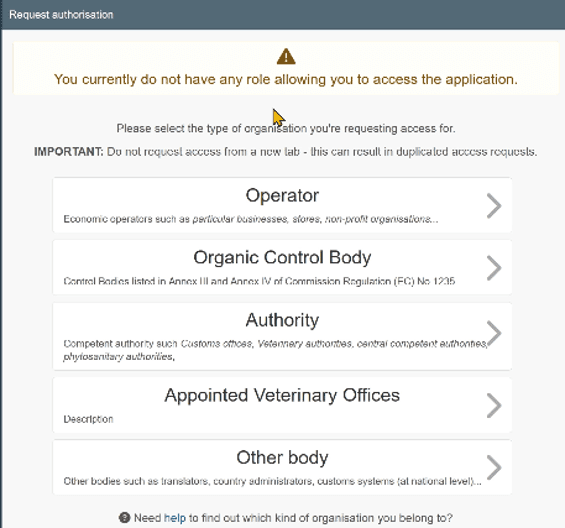
After logging in, your colleague will see a message saying:
‘You currently do not have any role allowing you to access the application’.
They must click on ‘Operator’ to request access.
Your colleague must then:
-
Enter the company details in the search field.
-
Click on 'Zoeken' or ‘Search’.
-
Select the correct company by ticking the box in the last column.
-
Click on the green ‘Request Authorization’ button.
A screen called ‘Confirm authorisation request’ will then appear. Your colleague does not need to enter any information on this screen. They can click directly on ‘Send authorisation request’.
The request will be sent to the Master User of your company account.
-
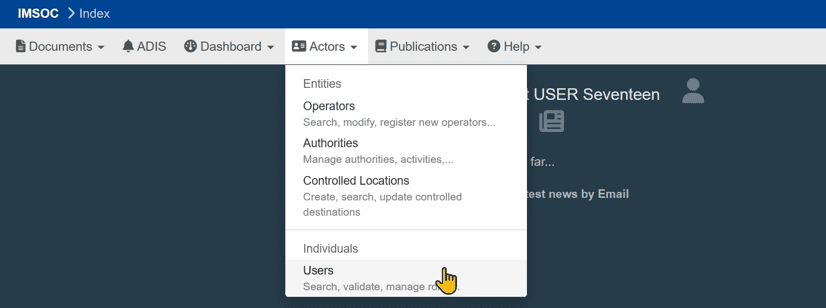
The Master User must log in to DIWASS and follow these steps:
-
Click on the ‘Actors’ tab.
-
Select ‘Users’.
-
On the ‘Search Users’ screen, click on ‘Search pending requests’. You can also search for the person using their email address.
-
Click on the name of the person requesting access.
-
If you approve the request, click on the green tick.
You can also give the user administrator rights by ticking the additional box. This means that the user can also manage the company account as a Master User.
Finally, click on ‘Save Changes’ at the top of the page to save your changes.
The user can now act on behalf of your company in DIWASS.
-